LineOrder gives you the ability to place an order by using the horizontal line object from the toolbar menu.
You can also control stop loss and take profit buy moving its horizontal lines.
For example, if you what to buy EURUSD, just drag and drop a horizontal line in your EURUSD chart window.
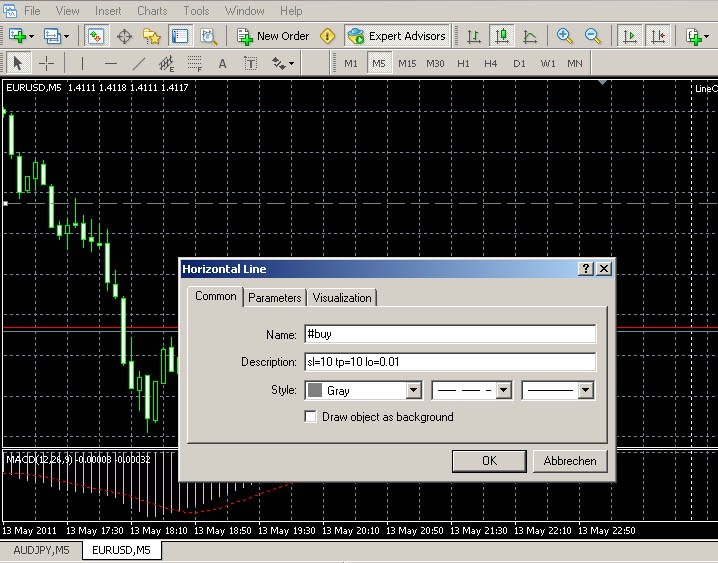
Double click on the horizontal line and change the "name" (on the common tab) to #buy and click the OK-button, that's it!
(If a double click doesn't work, go to "Tools->Options->Objects" and set the hook "Select object by single mouse click").
To close an order, just remove the horizontal-order line.
Additional options like stop-loss, take-profit, lot-size and trailing-stop can be passed into the description field.
E.g. for a 20 pips stop-loss and 10 pips take-profit just click into the description field and type: sl=20 tp=10
Use whitespace to separate options (Picture A). Default values can be set in the EA properties.
To disable an active trailing-stop, click on the horizontal-order line and write ts=-1 in the description field.

To Do: Pending Orders
Commands: (name field)
#buy  		buy order
#sell  		sell order
#selltp		sell order and set take profit at the horizontal line
#sellsl		sell order and set stop loss at the horizontal line
#buytp		buy order and set take profit at the horizontal line
#buysl		buy order and set stop loss at the horizontal line

Options: (description field)
ts		trailing stop in pips
sl		stop loss (pips)
tp		take profit (pips)
sq		stop loss (price)
tq		take profit (price)
lo		lot size
10296Best MetaTrader Indicators + Profitable Expert Advisors


